Quick answer: count the EVs your driveway will hold over the next five years before you count amps. The Tesla Wall Connector terminates in a NACS handle that no J1772 car can accept, so it belongs in a garage that stays Tesla-only. The ChargePoint Home Flex terminates in J1772 and still charges a Tesla through the adapter that came with the car, which is why it survives a second EV, a trade-in, or a new owner after you sell the house.
Where This One Actually Gets Decided
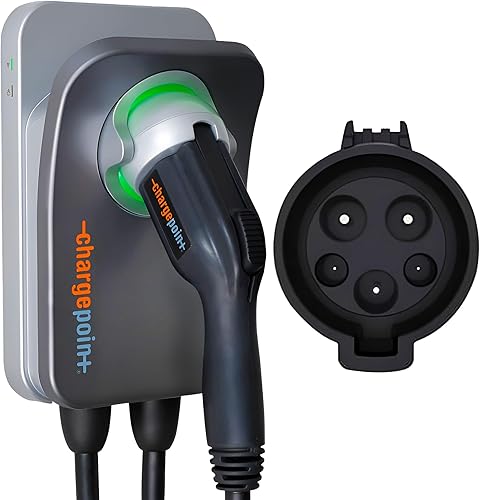
ChargePoint Home Flex
The Home Flex adjusts from 16A up to 50A and ends in the J1772 connector every non-Tesla EV uses. A Tesla charges from it with the adapter that ships in the car. That combination is why it is the default recommendation for a household that is not certain what it will be driving in 2031.
Check it on Amazon →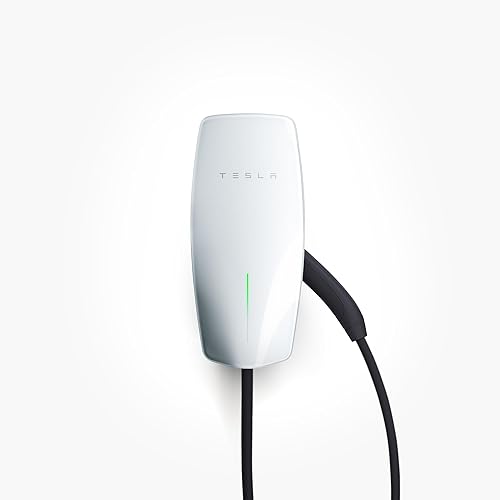
Tesla Wall Connector
The Gen 3 unit delivers 11.5 kW through a native NACS handle on a 24-foot cable, hardwired to the panel. In a garage where every car wears a Tesla badge it is the tidiest setup available, with nothing dangling off the end of the cable.
See it on Amazon →Wall Connector vs Home Flex, Line by Line
Both units are Level 2 chargers on a 240V circuit, and both land in the same price tier. Everything that separates them sits in the connector, the install method, and how far the amperage can be dialed.
| Charger | Amperage | Connector | Install | Cable | Smart | Price | Link |
|---|---|---|---|---|---|---|---|
| ChargePoint Home Flex | 16A to 50A adjustable | J1772 | NEMA 14-50 plug | 23 ft | WiFi, app, Alexa, Google | $$$$ | View |
| Tesla Wall Connector | Up to 48A | NACS | Hardwire only | 24 ft | WiFi, Bluetooth, Tesla app | $$$$ | View |
Price tiers are approximate. $ = under $50, $$ = $50 to 150, $$$ = $150 to 300, $$$$ = over $300. Tap any link for the current Amazon price.
The Connector Question That Traps Buyers
North America is in the middle of a slow switch from J1772 to NACS, and home chargers are caught in the crossover. The practical situation in 2026 is lopsided in one direction: a Tesla can charge from a J1772 charger using the adapter Tesla includes with the car, but a J1772 car cannot easily charge from a NACS wall unit. Tesla does not sell a NACS-to-J1772 adapter for home charging, and the third-party ones that exist are a support headache nobody wants between their panel and a new car.
That asymmetry is the whole argument. The ChargePoint Home Flex handles both fleets today. The Gen 3 Tesla Wall Connector handles one. If a second car arrives in a few years wearing a J1772 port, the Home Flex owner does nothing and the Wall Connector owner buys another charger and pays an electrician a second time.
Tesla does make a version that solves this. The Universal Wall Connector carries a built-in J1772 adapter alongside the NACS handle, and we put it head to head with another smart charger in our Tesla Universal Wall Connector comparison. It is a different product from the Gen 3 unit on this page, and the two are easy to confuse on a listing page, so check which one is in the cart before you buy.
Speed: 48A Hardwired vs a Plug-In Ceiling
On paper the Home Flex wins the amperage column, rated up to 50A against the Wall Connector's 48A. In the configurations most people actually buy, the result flips.
The Tesla unit is hardwire-only, so on a 60A circuit it delivers its full 48A, about 11.5 kW. The ChargePoint ASIN linked here is the NEMA 14-50 plug-in model, and a plug-in charger on a 14-50 outlet is limited to 40A continuous, because the National Electrical Code caps a continuous load at 80 percent of the circuit rating. That works out to roughly 9.6 kW. ChargePoint's own installation guidance is consistent on this point: the full 50A arrives only on the hardwired variant wired to a larger breaker.
Before that gap changes your mind, check what your car can take. Plenty of EVs have onboard chargers rated at 7.2 kW or 9.6 kW, and those cars draw the same power from either unit. The difference only shows up on vehicles that accept 11.5 kW or more, and even then it is roughly an hour of overnight charging that nobody is awake for. Our guide to 48A chargers walks through which cars actually use the top of that band.
Apps, Scheduling and What Each One Tracks
The ChargePoint Home Flex runs on WiFi with ChargePoint's own app, which handles scheduling, energy reporting per session, and amperage adjustment from the phone. It also talks to Alexa and Google Home, and it carries an Energy Star certification. Changing the current draw without opening the enclosure is genuinely handy if you move the unit to a different circuit later.
The Tesla Wall Connector has WiFi and Bluetooth, but the emphasis is different. Bluetooth and WiFi exist mainly for commissioning the unit and pulling firmware updates, and the scheduling that most Tesla owners use lives in the car and the Tesla app rather than in a charger app. If you drive a Tesla, that is arguably a cleaner arrangement, since charge scheduling and departure timing already sit in the vehicle. If you do not drive a Tesla, it is moot, because the Gen 3 unit cannot charge your car in the first place.
Installation: One Needs an Electrician, One May Not
This is the second real cost difference, and it is easy to leave out of the comparison.
The Tesla Wall Connector is hardwire-only. There is no plug on it, so a licensed electrician runs conduit from the panel and lands the conductors in the unit. Budget for permit and labor on top of the hardware in every case.
The ChargePoint ASIN here arrives with a NEMA 14-50 plug. If a correctly wired 14-50 outlet is already on the garage wall, installation is a matter of mounting the bracket and plugging it in. If not, you are paying an electrician for the outlet, which usually still costs less than a hardwired run. The plug also means the charger comes with you when you move, which the hardwired Tesla unit does not. We compare the two install paths in detail in our NEMA 14-50 versus hardwire breakdown.
One install note that rarely makes the spec sheets: the Tesla unit's 24-foot cable and the ChargePoint's 23-foot cable are both long enough to reach across a two-car garage, but only if the unit is mounted on the correct side. Measure to the car's charge port, not to the parking spot. Charge ports sit on the left rear on a Tesla and the front fender on plenty of other brands, and a cable routed the long way around a parked car loses several feet of useful reach.
What Owners Run Into After Install
Spec sheets cover the easy part. Here is what surfaces repeatedly in verified-purchase feedback for both units, summarized in our own words rather than quoted.
ChargePoint Home Flex
Owners consistently describe the hardware as solid and the amperage adjustment as the feature they use most, particularly people who started on a smaller circuit and moved up later. The recurring complaint is the connected side rather than the charging side: buyers report WiFi dropouts and firmware updates that need a re-pair, and the unit keeps charging through all of it, which softens the blow. If the garage sits at the far edge of the router's range, plan on an access point out there.
Tesla Wall Connector
Feedback skews toward how unobtrusive it is day to day. Owners describe a unit that gets mounted, commissioned once, and then ignored for years, with the car handling scheduling. The complaints that come up are about the install rather than the product: the hardwire-only design means no quick relocation, and buyers who assumed the Gen 3 unit would charge a non-Tesla car describe that discovery as an expensive surprise. Check your connector type before checkout.
Jacob’s read on this matchup
I treat a home charger as a fixture on the house, not an accessory for the car in the driveway right now. Cars turn over every few years; a hardwired charger stays on that wall for a decade and gets inherited by whoever buys the house. That framing makes the connector decision easy. A J1772 unit charges everything including a Tesla, so it keeps working through a trade-in, a second car, and a sale. A NACS-only unit is a bet that the garage stays Tesla-only for the life of the hardware. That bet is perfectly reasonable if you are a two-Tesla household with no plans to change, and it is a bad one if you are guessing. The speed gap between these two is worth about an hour overnight. The connector gap is worth the price of a second charger plus a second electrician visit.
Which One Belongs on Your Wall
Buy the ChargePoint Home Flex if there is any chance a non-Tesla EV joins the household, if you want the charger to move with you, if a NEMA 14-50 outlet is already in the garage, or if you would rather not commit the wall to one connector standard for the next decade. The adjustable amperage is a bonus for anyone on a panel that is already close to full, a situation we cover in the hardwired charger guide.
Buy the Tesla Wall Connector if the garage is Tesla-only and staying that way, you are hardwiring regardless, and you want the full 48A with a native NACS handle and no adapter in the loop. It is the cleaner installation for that specific household, and the 24-foot cable is the longest of the two.
If you want the Tesla build with J1772 compatibility, skip both and look at the Universal Wall Connector instead. It is the version that removes the tradeoff this article is built around.
FAQ
How We Put This Head-to-Head Together
Both units were checked against their manufacturer specification sheets on 2026-09-30, with connector type, amperage range, cable length, install method and certification confirmed per product rather than assumed from the category. Where the two differ on a spec we checked each one separately, because the plug-in and hardwired variants of the ChargePoint carry different amperage ceilings and it is easy to quote the wrong one.
We do not accept review units or manufacturer payment, and no brand had sight of this comparison before it went live. Ranking here reflects which charger fits the widest range of real driveways, not which one pays more.
Prices and availability reflect Amazon listings at time of writing. Confirm on the product page before purchase.