Quick answer: the R1T's huge pack rewards a full 40-48A circuit, and the Tesla Wall Connector earns the top spot by plugging into the truck's NACS port with no adapter. Prefer J1772 hardware? The Emporia Pro Level 2 covers it with load management for a crowded panel, and the ChargePoint Home Flex brings the premium app experience in the same price tier.
The R1T Shortlist, Settled
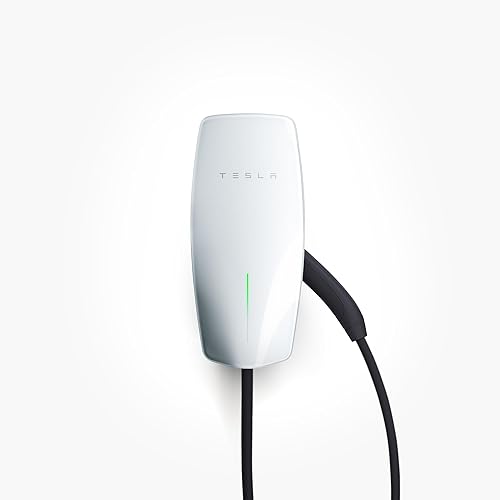
Tesla Wall Connector
Built for NACS from the ground up, this charger plugs straight into the R1T without an adapter. 48A speed matches the R1T's ceiling, with WiFi control and no monthly fee. Most direct integration with the R1T.
View on Amazon →Emporia Pro Level 2
Full 48A charging plus WiFi app control. Works with the R1T's standard J1772 adapter. Smart scheduling and energy tracking at a lower price than other features-rich options.
See it on Amazon →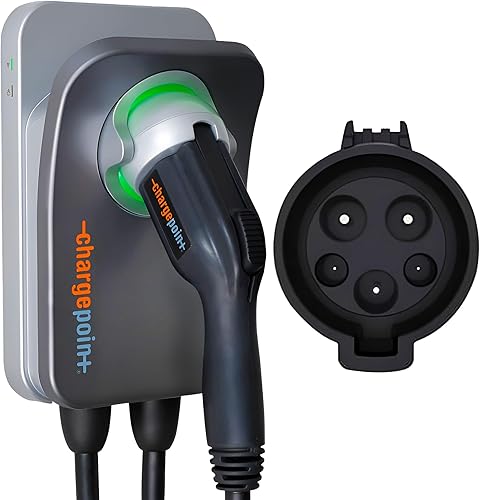
ChargePoint Home Flex
Adjustable 16-50A amperage, best-in-class app with per-session cost tracking, and Alexa plus Google Home support. Premium choice for smart-home integration with the R1T.
Check it on Amazon →R1T Options in One Table
All three chargers deliver Level 2 power at 240V. The Tesla supports NACS natively. The Emporia and ChargePoint use J1772 and work with the R1T's included J1772 adapter. Speed figures show miles of R1T range added per hour of charging on a 48A circuit.
| Charger | Amps | Connector | Smart Features | Price | Link |
|---|---|---|---|---|---|
| Tesla Wall Connector | 48A | NACS | WiFi app, no monthly fee | $$$$ | View |
| Emporia Pro Level 2 | 48A | J1772 (adapter) | WiFi app, scheduling | $$$$ | View |
| ChargePoint Home Flex | 50A adjustable | J1772 (adapter) | WiFi, Alexa, Google Home, per-session tracking | $$$$ | View |
Price tiers are approximate. $ = under $50, $$ = $50 to 150, $$$ = $150 to 300, $$$$ = over $300. Tap any link for the current Amazon price.
R1T Driveway Reports
Real-world feedback from verified buyers who've installed these chargers at home. Pulled from top-helpful reviews as of 2026-05-20.
Tesla Wall Connector (4.8-star verified-buyer average)
R1T owners consistently praise the straightforward NACS compatibility and reliable daily charging. Verified buyers describe the built-in WiFi control as responsive and rarely glitchy, and several point out that having no subscription or monthly fee keeps the long-term cost reasonable. Setup feedback is positive, with owners reporting quick hardwired installation. A few users mention that the cord is heavier than expected, but durability across all seasons gets strong marks.
Emporia Pro Level 2 (4.8-star verified-buyer average)
Verified R1T owners report the Emporia handling daily charging without a hiccup through a J1772 adapter. Multiple reviews highlight the app's ease of use for scheduling off-peak charging and tracking energy usage over time. The familiar note about a thick, less flexible cable shows up here too, but the value relative to performance wins clear praise across the board.
ChargePoint Home Flex (4.3-star verified-buyer average)
R1T owners in the ChargePoint reviews appreciate the adjustable amperage feature, which helps on older electrical panels. Owners charging a Rivian through a J1772 adapter rank the companion software at the top of the charger apps they've tried, and the per-session cost breakdown is flagged as useful for tracking charging patterns. A smaller subset of reviews report app connectivity hiccups, so reliability is slightly lower than the Tesla or Emporia, but the feature set appeals to smart-home-focused owners.
Jacob’s read on this category
The R1T’s 135 to 165 kWh pack changes home-charging math more than its NACS port does. It is the same problem the F-150 Lightning poses, minus Ford's 80A option, which is why the 48A class is the ceiling here. Even at 48A a full refill runs 15 to 17 hours, so you are not buying charge-to-full-tonight; you are buying daily replacement of 100 to 150 miles, and every unit here clears that bar overnight. Where I would not economize is amperage: a truck that tows or runs trails comes home with deficits a small charger compounds across the week. The connector question solves itself, since the native-NACS Wall Connector is tidiest but the included J1772 adapter makes the other two a wash; choose on amps and build, not the plug.
Rivian R1T Charging Basics
The Rivian R1T comes standard with an 11.5 kW (48A) onboard charger, which is among the fastest home chargers you can install. Depending on the trim, the R1T's battery ranges from 135 kWh to 165 kWh. On a 48A charger, you can add roughly 25-30 miles of range per hour, which translates to roughly 15-17 hours for a full charge from near-empty.
The R1T uses NACS (North American Charging Standard) as its native connector, the same standard as Tesla. Rivian includes a J1772 adapter in the mobile connector bundle, so you can charge at any public Level 2 station or at a friend's J1772 charger. For home use, a NACS-native charger is more convenient, but J1772 chargers work perfectly with the adapter.
Unlike some trucks that sit idle for long stretches, the R1T is meant for regular weekend use and road trips. Most owners rely on home Level 2 charging for daily top-ups (adding 100-150 miles overnight), and use Superchargers for longer journeys beyond the truck's maximum range.
Charging Speed With a 135 to 165 kWh Pack
The R1T's 48A onboard charger sets the effective ceiling for home Level 2 charging. The Tesla Wall Connector, Emporia Pro, and ChargePoint Home Flex (at 48A or higher) all deliver the same speed to the battery: roughly 25-30 miles of range per hour, depending on factors like ambient temperature and battery state of charge.
For daily driving, overnight charging on any of these three chargers fully refills the battery and covers commutes up to several hundred miles. The choice between them comes down to budget, smart features, and connector preference, not charging speed.
Smart Features
The Tesla Wall Connector offers WiFi app control without a subscription, which appeals to owners who want to monitor charging remotely or shift sessions around peak hours. It integrates with Tesla's ecosystem, though Rivian owners can still control it via the Tesla app or through their car.
The Emporia Pro Level 2 includes WiFi scheduling, real-time energy tracking, and the ability to set amperage limits if needed. The app is straightforward and reliable, with no monthly fees. Off-peak scheduling is simple and effective for owners interested in lowering their charging costs.
The ChargePoint Home Flex is the premium option for smart integration. It pairs directly with Alexa and Google Home for voice commands, tracks cost per charging session, and lets you adjust amperage from 16-50A via the app. It's the deepest feature set, though it does require more familiarity with the interface. Some owners report occasional connectivity hiccups, so reliability is slightly below the other two.
Installation
All three chargers require a dedicated 240V circuit and typically mount on a garage wall near your electrical panel. The Tesla and Emporia can be either hardwired or plugged into a NEMA 14-50 outlet. The ChargePoint Home Flex also supports both installation methods, giving you flexibility if you want to add a second EV later without rewiring.
Installation by a licensed electrician typically runs $300-800, depending on how far your panel is from the proposed charger location and local labor rates. Skip the federal credit in your math: Section 30C ended for chargers placed in service after June 30, 2026 (a pre-deadline install can still claim 30%, up to $1,000). Rebates from your state or electric utility are the realistic offset now.
If your garage already has a 240V outlet (like a dryer outlet), you can use a NEMA 14-50 plug and just plug in any of these three chargers. Otherwise, budget for an electrician to run a new dedicated circuit.
Which Charger for Your R1T
Get the Tesla Wall Connector if you want the most straightforward integration with your R1T. NACS natively, no monthly fees, and reliable WiFi control. Best choice for R1T owners who want to match the car's connector standard without thinking about adapters.
Get the Emporia Pro Level 2 if you want full 48A speed with smart scheduling and energy tracking and a charger that can throttle itself when the rest of the house is drawing hard. Works great with the R1T's included J1772 adapter, and the app is intuitive for off-peak charging schedules.
Get the ChargePoint Home Flex if you're all-in on smart-home integration, want adjustable amperage for panel flexibility, and value per-session cost tracking. Best for households with multiple EVs or future-proofing in mind, though the app is more complex than the other two.
FAQ
How We Picked These for the R1T
For this comparison we prioritized chargers compatible with the R1T's 48A onboard charger and either NACS-native or widely available J1772 systems. Live Amazon prices and availability were pulled via data aggregation on 2026-05-20, and each charger was cross-checked against verified-purchase owner reviews (rating and top-helpful reviews) before selection. We focused on the 40-48A range where charging speed and price-to-feature ratio actually vary meaningfully.
The R1T list is built from Rivian's published AC charging limits, charger spec sheets, certification listings, and verified-buyer review themes; manufacturers do not pay for placement or send review units.